How to send emails in your Node.js app using Nodemailer and Mailtrap

In this article, we will be covering the basics of sending emails from your Node.js using nondemailer and mailtrap.
Pre-requisite
- A mailtrap account (You can create one here )
- Node.js
Now that that's set-up. Let's get to it
Set-up your code and install the dependencies
1) Create a folder that you want to work in and cd into it
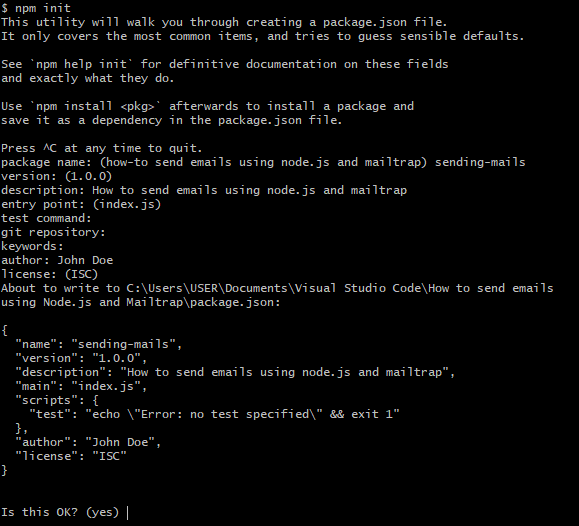
2) Create a package.json file by running npm init . Provide answers to the question as seen in the picture below
3) Install the following dependencies- body-parser, dotenv, express
4) Install nodemon as a dev dependency
5) Edit your package.json file and add the following to your scripts
"start": "node server.js",
    "dev": "nodemon server.js"
Set up your index.js file
const bodyParser = require('body-parser');
const express = require('express');
const dotenv = require('dotenv');
const app = express();
dotenv.config();
app.use(bodyParser.urlencoded({ extended: false }));
app.use(bodyParser.json());

const PORT = process.env.PORT || 4000;

app.listen(PORT, () => console.log(`Server listening on port ${PORT}`));
module.exports = { app };
Set-up your mailtrap.io account and get the keys
- Go the settings page and take note of the 4 credentials for the Node.js integration
- Add the credentials to your
.envfile
Sending mails
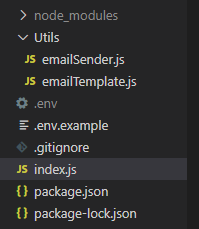
The folder structure
const nodemailer = require('nodemailer');
module.exports = {
  sendEmail: async (options) => {
    const transporter = nodemailer.createTransport({
      host: process.env.SMTP_HOST,
      port: process.env.SMTP_PORT,
      auth: {
        user: process.env.SMTP_USER,
        pass: process.env.SMTP_PASSWORD,
      },
    });

    const message = {
      from: `${process.env.SENDER_NAME} <${process.env.SENDER_EMAIL}>`,
      to: options.email,
      subject: options.subject,
      html: options.message,
    };
    await transporter.sendMail(message);
  },
};
Create your email body. This can either be a snipped of HTML code (e.g. <p> Hello there </p>) or an entire HTML page. We'll be using the later.
exports.message = async () => {
  const html = `<!DOCTYPE html> <head> <title> Greetings</title> </head>
  <body> <p> Hello there. How are you? </p></body>
  </html>`;
  return html;
};
Create your POST route that handles that wraps everything up.
We'll use this in the index.js file
Start by importing the required functions
const { sendEmail } = require('./Utils/emailSender');
const { message } = require('./Utils/emailTemplate');
The route
app.post('/', async (req, res, next) => {
  const { email } = req.body;
  try {
    const result = await sendEmail({
      email,
      subject: 'Hello World!',
      message: await message(),
    });
    res.status(200).json({ status: 'Email sent', result });
  } catch (err) {
    res.send('Email not sent');
    // next(err);
  }
});
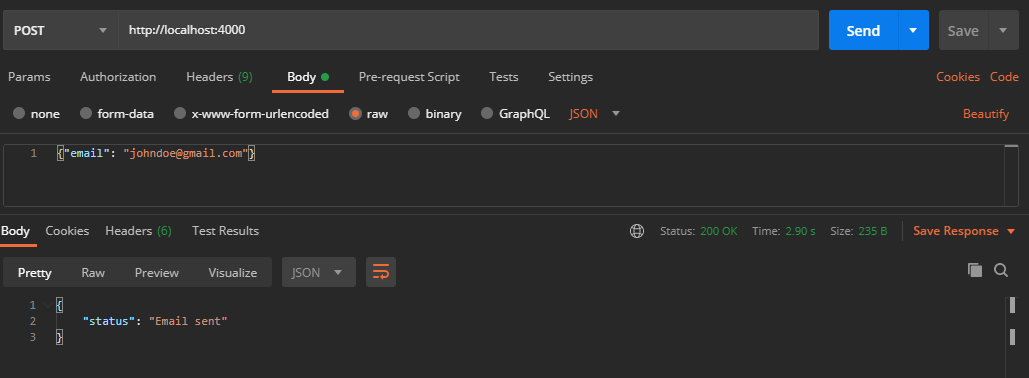
Let's test this on Postman.
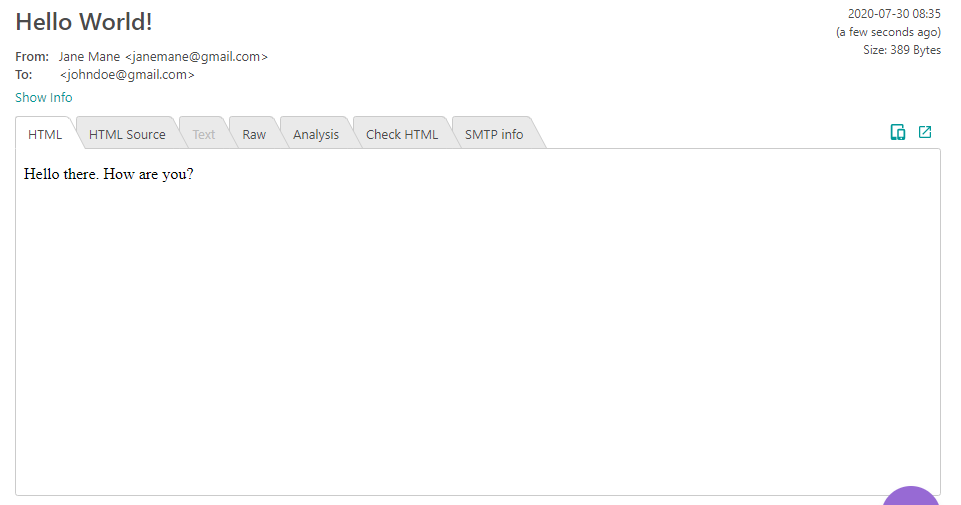
Let's check mailtrap for the email
Now that you've learned how to send emails, you can try in your project.
You can also check out the full source code here
If you like this article, feel free to comment and share. You can also reach out to me on Twitter | LinkedIn | Github
Ciao👋🏼
About the author
I am a software developer and project manager; passionate about solving problems through IT.
Comments
Join the discussionSoon I'll be using Node.js to create a project that will need to send personal emails to customers.
I just bookmarked this. Thanks for sharing!